
How Reviews Work
Pebble partners with Reviews.io, a third-party platform, to collect and manage all reviews across the marketplace.
Why this matters for you
- Only verified bookings can leave a review — no fake reviews, no spam.
- Built-in moderation filters out abusive language and spammy content before anything gets published.
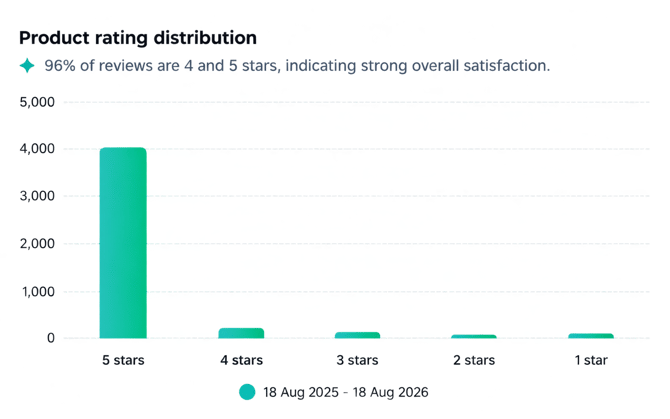
- Platform-wide average: 4.9 stars (as of August 2026) — the vast majority of reviews are 5-star.
How a review gets left
Within an hour of a customer attending their first session, Reviews.io automatically emails them an invite to leave a review (sent from reviews@bookpebble.co.uk). Because the invite goes out right after the session, reviews reflect genuine, fresh experiences.
Review invites won't appear in the Customer's Email History page due to them being sent by REVIEWS.io
Want more reviews coming in? Ask Pebble Support about triggering reminder emails to past bookers, or encourage customers directly:
- Prompt attendees at the end of a session to watch their inbox for the invite
- Mention it through your own channels (newsletter, WhatsApp group, etc.)
Where reviews appear
Reviews show up in three places on the Pebble marketplace:
- Activity card listings
- Activity detail pages
- Your provider profile page
⚠️ Note: If you're using Pebble's iFrame integration on your own website, reviews won't display there — they're only visible on the Pebble marketplace itself.
Managing your reviews
| Task | How to do it |
|---|---|
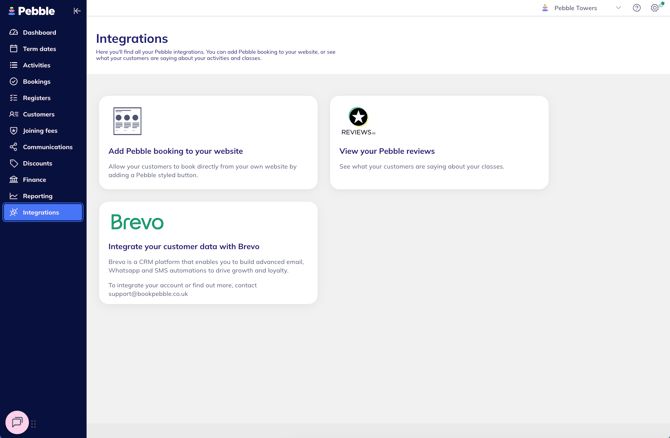
| View your reviews | Supplier portal → Integrations → View your Pebble reviews |
| Respond to a review | Contact Pebble Support (live chat or support@bookpebble.co.uk) with your response — we'll post it for you |
| Request a guardian revise their review | Ask Pebble Support — we can reach out on your behalf if warranted. It's always worth trying to resolve the issue with the guardian directly first |
| Turn off reviews entirely | Not possible by default — but reach out if reviews are negatively affecting your relationship with Pebble |
You can view your own reviews directly in the portal, but responding or requesting changes always goes through Pebble Support, since guardian contact details are kept private.
Dealing with a negative review
Can Pebble remove a bad review? Generally, no — Reviews.io's terms don't allow removal just because a review is negative. This keeps the system fair and unbiased for everyone.
The one exception: if a review breaches the terms and conditions (profanity, spam, etc.) but somehow slips past automatic moderation, contact Pebble Support and we can ask Reviews.io to review and moderate it.
So what can you actually do? If the review is from a genuine customer, it's usually worth working through these in order:
- Resolve the issue directly with the customer, if you can identify them.
- Request a revision — ask Pebble Support to reach out to the guardian on your behalf.
- Reply publicly — send your response to Pebble Support and we'll post it for you.
When guardians see a negative review, they're often more interested in your response than the review itself — was it a mistake you've owned? A misunderstanding? Something the customer missed in the listing? Companies that accept accountability and apologise publicly tend to win trust, not lose it.
A longer-term tip: a single negative review carries more weight when your total review count is low. Building up your overall volume — via reminder emails or encouraging attendees to check their inbox — softens the impact of any one bad review.
A privacy note: guardian contact details are always protected, and some guardians review anonymously. Pebble can't share their private details with you directly, but we can always reach out to them via Reviews.io on your behalf.
Why reviews are worth investing in
- Social proof — shows your class is legitimate and real guardians are attending
- Free marketing — showcases what people love about your business
- A feedback loop — helps you continuously improve your offering
- Builds trust — handling even the occasional bad review well shows customers you're transparent
Quick FAQ
Can I switch reviews off? No — they're enabled for all providers by default, to keep things consistent and fair. Reach out to Pebble if you have concerns.
Can I respond to a review? Yes, via Pebble Support — send us your response and we'll post it.
Can I give feedback on the reviews feature itself? Yes — contact Pebble Support.
Questions? Contact Pebble Support (use live chat for the quickest response, or email support@bookpebble.co.uk).