
1. Why does Pebble use months and years for creating an activity?
We have chosen to use months as well as years because classes for younger children benefit from displaying a much more granular age range. You can use a combination of months and years in your age range, such as 16mths - 4yrs.
2. Will this show as months or years to my customers?
On your activity, we count ages purely in months up to age 2. After 2 years it will show as years only with months as an additional - for example you could have 0 - 2yrs 2mths.
3. What should I do if my activity is aimed at adults too?
If your activity is aimed at children but you want an adult to accompany, please enter the age range of the target children who should attend. You can explain in your activity details that adults may accompany.
If adults are expected to take part in an activity, such as prenatal or first aid classes, you you can add a maximum age range of 100 years.
Here are some tips for setting age ranges to include adults:
-
Any maximum age over 18 will display as 18yrs+. For example, you could have an activity that displays 5yrs-18yrs+.
-
If the minimum age is set as 18 and maximum is over 18, your activity will simply display 18yrs+ instead of an age range.
-
If you enter 0 as the minimum age and 100yrs/1200mths as the maximum age, your activity will be advertised for 'all ages'.
4. How does Pebble use the age range to identify who is appropriate to attend the activity?
4.1 Soft age range
With this option, parents/guardians will see a warning at checkout if the class doesn’t suit their child’s age. For example, if they try to book a class for a 20-month-old but the class is only suitable up to 18 months, they’ll be notified that the activity may not be a good fit. However, they won’t be blocked from booking. We recommend regularly reviewing your bookings in advance via the Bookings section of the supplier portal.
4.2 Hard age range
With this option, parents/guardians can only book activities if their child falls within the set age range. For example, if they try to book a class for a 20-month-old but the class is only suitable up to 18 months, they won’t be able to complete the booking.
To make things even easier for you, we've prepared a cool table that converts every 12 months to years, from 0 to 100 years:
|
Months |
Years |
|
Months |
Years |
|
Months |
Years |
|
0 |
0 |
|
72 |
6 |
|
144 |
12 |
|
12 |
1 |
|
84 |
7 |
156 | 13 | |
|
24 |
2 |
|
96 |
8 |
|
168 |
14 |
|
36 |
3 |
|
108 |
9 |
|
180 |
15 |
|
48 |
4 |
|
120 |
10 |
|
192 |
16 |
|
60 |
5 |
|
132 |
11 |
|
204 |
17 |
|
|
216 |
18 |
5. Year group, class or skill level
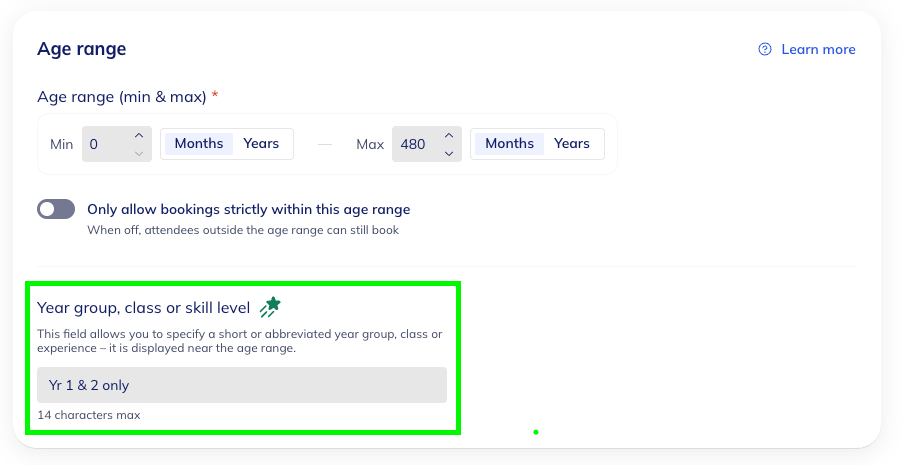
You can add optional Age Range Descriptors to activities
Where they appear: Alongside the activity age range on both supplier and activity pages.
How it works: It’s an optional text field - it will not restrict or block bookings.
Purpose: Rather than including the year group, class or skill level in the activity title - this provides a dedicated space to include this information.
We value your input and are always looking for ways to improve our communication and services.
If you have any questions or feedback about this feature, please reach out to us on the chat icon or at support@bookpebble.co.uk.