
Key Principles
To maintain the integrity of credit balances, Customer Credit follows these rules:
- Exclusivity: Credit issued by a specific provider can only be redeemed with that same provider.
- No Portability: Customers cannot transfer credit between different accounts.
- No Cash Value: Credit cannot be withdrawn as cash or spent outside of the provider’s system.
How to Enable Customer Credit
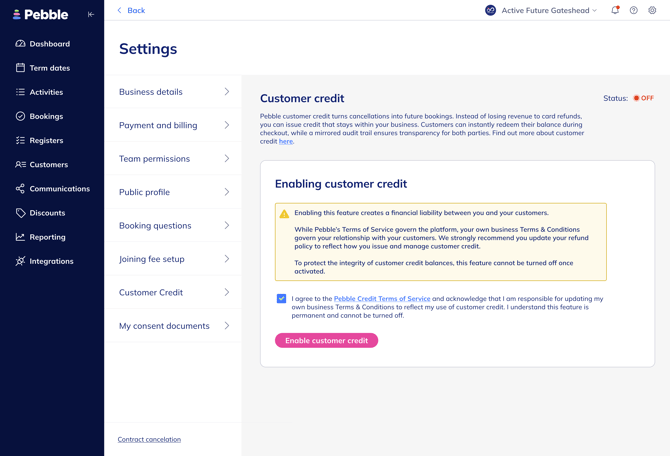
Before you can begin issuing credit, you must enable the feature in your settings:
- Navigate to Settings > Customer Credit.
- Review the terms and toggle the status to ON.
- Important: Once Customer Credit is enabled, it is a permanent setting and cannot be turned off. This ensures that any credit issued to parents remains redeemable.
- Note that only admins have the permissions to enable this feature or manage customer balances.
Managing Customer Credit
Providers have full control over issuing and tracking credit through the Supplier Portal.
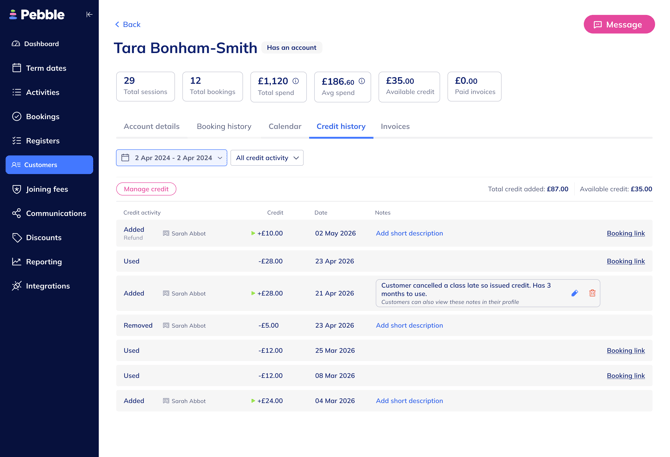
- Global History: Every customer profile includes a Credit History tab that provides a full ledger of all credit-related events.
- Direct Adjustments: You can manually Add or Remove credit for any customer by visiting their profile, independent of a specific cancellation flow.
- Audit Trail: Every adjustment is logged with the name of the admin who performed the action, a timestamp, and optional internal or external notes.
Issuing Credit During Cancellations
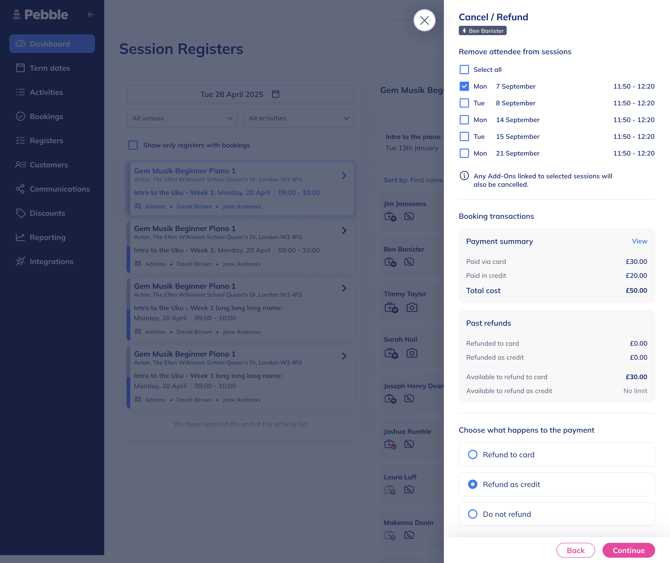
When you cancel a booking or remove an attendee from a session, Pebble presents three options for handling the payment:
- Refund to Card: This is capped at the original amount the customer paid via card. The system tracks original card payments to prevent over-refunding.
- Refund as Credit: This option is uncapped, allowing you to issue credit beyond the original transaction value if desired (e.g. as a goodwill gesture).
- Do Not Refund: No funds or credits are returned to the customer.
The Customer Experience
Parents can easily track and use their available credit:
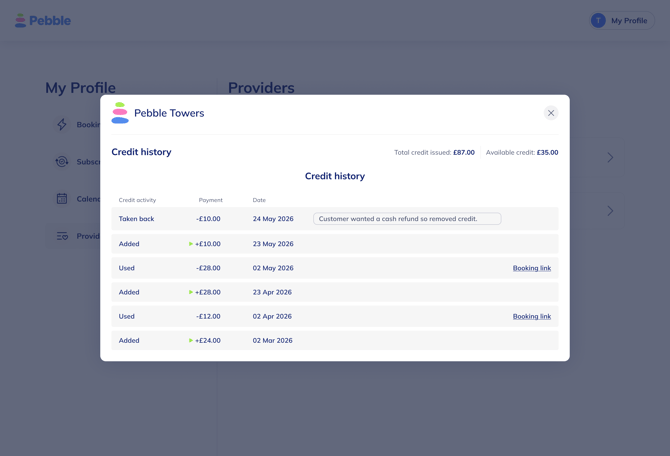
- Profile Visibility: Parents see a list of providers where they hold a balance in their "My Profile" section.
- Ledger Transparency: By clicking "View history," parents see a mirror image of the provider's ledger, including any notes added by the provider.
- Checkout Recognition: If a parent has an available balance, an Apply Credit section will automatically appear on the "Review/Pay" screen during checkout.
- Partial Redemption: Parents can choose to spend their full balance or enter a specific amount to apply to their booking. The total price updates in real-time once credit is applied.
Important Restrictions and Notes
- Account Requirement: Customers must have a registered Pebble account to receive or redeem credit. Consequently, credit functionality is not available for guest bookings.
- Usage Limits: Credit can only be used for immediate payments made at the time of booking. It cannot be used for post-trial payments or future subscription payments.
- Additional Fees: If a booking requires a Joining Fee, credit cannot be applied to that fee.
- Account Level: Credit is held at the Payer (Parent/Customer) account level and can be used for any child associated with that parent.
- Non-Transferable: Credit cannot be transferred between different parent accounts or different providers.
- Liability: Liability for the balance and usage sits with the provider; disputes are to be handled directly between the customer and provider.