
Starting 1st January 2027, the UK’s DMCCA legislation introduces strict statutory rules for subscription businesses. BookPebble is automating compliance across five key areas so you stay fully protected without the admin headache- this will be effective week commencing 14th December 2026 to ensure you are compliant before the rules are in place:
- Provider Cancellation Policies: Notice periods are capped at a maximum of 30 days (default setting). A 14-day statutory cooling-off period applies to all new bookings and trial conversions by law.
- Customer Booking Journey: Checkout flows will explicitly highlight billing dates, ongoing costs, and exit terms before payment to ensure terms are legally binding.
- Renewal Reminders: BookPebble will automatically send the legally required reminder emails every 6 months and before trial conversion.
- Customer Cancellations: Customers can self-serve cancellations online. BookPebble automatically calculates notice periods, final prorated fees, and cooling-off refunds.
- Cancellation notification and management: You get instant dashboard notifications and cancelled attendees are clearly flagged on registers. You will be able to process cancellations as per your policy on behalf of the customer.
What you need to do:
- Check your notice period: Accounts will default to 30 days. If you operate a shorter notice window (e.g., 7 or 14 days), adjust this in your settings prior to launch. Note: you can’t update your notice period now but you will be able to in the coming weeks prior to launch.
- Update your T&Cs: Ensure you have uploaded links to your terms under “settings” and that they are compatible with the new legislation.
- Turn on logged-in checkout (optional): Contact support@bookpebble.co.uk to enforce logged-in checkout so customers always have access to their bookings.
1. Provider cancellation policy
The DMCCA requires that customers are able to cancel online via a straightforward, single-journey process. There must be no unnecessary retention screens, hidden phone numbers, or notice hurdles. Customers must also be auto-refunded where applicable.
In light of the above - BookPebble will be implementing the following:
Cancellation notice period
-
Within the supplier portal, you can define notice periods of 0, 7, 14, 21, 28 or 30 days.
-
We are capping the maximum notice period at 30 days. Under UK consumer law, notice periods longer than the renewal period (1 month) are typically deemed "unfair" and legally unenforceable. By setting this cap, we prevent you from accidentally voiding subscription contracts.
-
By default and upon release of this functionality, BookPebble will set cancellation periods to 30 days. However, you will be able to update this at any time within their BookPebble account and will be able to set this in advance of the feature going live.
-
Note that any updates to the cancellation period after this date will only apply to future bookings (i.e. when a booking is made, BookPebble will capture the cancellation period that was in place at the point of booking).
-
Historical bookings - because customers have already accepted cancellation terms, bookings made before the launch date fall outside of the new terms and aren't covered by this legislation. These should therefore be cancelled manually as currently, and aligned to your terms as they were at the point of that booking being made,
Provider minimum term
-
BookPebble will provide a text field to communicate your minimum term expectations (e.g., "Minimum term 3 months. Early cancellations may incur a charge") to the customer on the booking review screen prior to checkout, we will not automatically calculate or enforce a minimum term.
-
Providers will be responsible for manually calculating minimum term fees due after the final payment, and invoicing customers directly for any fees due.
NOTE: DMCCA states that customers should receive a 14-day cooling-off period. This period will run from the date of booking AND from when a trial converts (if a trial is set up and selected) . During the cooling-off period(s) the cancellation notice period is irrelevant - the customer can cancel at any time and receive a prorated refund for the remaining sessions in the month or trial. You may wish to review how their trial setup in light of this.
2. Customer booking journey
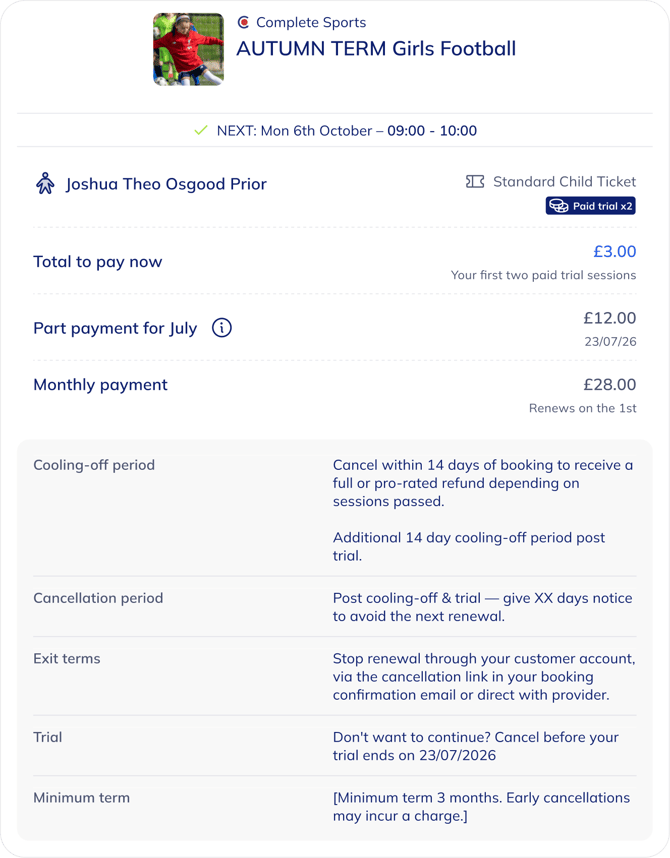
To legally enforce a cancellation policy, the DMCCA requires transparency at checkout. For legal compliance, we are updating the booking journey to prominently display all Pre-Contract Information separately from the general T&Cs.
The Checkout journey will dynamically display:
- Pro rata cost for the first month (if applicable)
- Trial cost (if applicable)
- Ongoing monthly cost
- Cancellation period
- Subscription renewal dates and frequency
- Exit terms and process
- Cooling-off period details
3. Renewal reminders
As part of the new changes, customers must receive a notification about payments due to be taken. BookPebble will automate the entire DMCCA-mandated reminder schedule, keeping you compliant without the added admin of sending these yourself. Renewal reminders will be sent every six months, and before a trial converts.
The renewal reminder will hold:
-
Payment schedule and amount due to be taken
-
Previous amount paid
-
Instructions and a direct link for customers to cancel
There are strict guidelines regarding the prominence of this information within renewal reminders and limits to what else they can contain. So, these emails will not be customisable (beyond carrying your business image if uploaded in your communication tab) - they can hold no marketing communications.
4. Customer cancellations
Logged-in Checkout (optional): We advise you to enable "Logged-in checkout only" by contacting support as relying solely on email confirmation links can lead to lost access. Forcing an active user account guarantees customers maintain continuous access to their cancellation links.
Customers must be able to cancel online via a straightforward single-journey process. Customers will be able to cancel via:
-
Booking confirmation email
-
The cancellation link/ button will be displayed prominently on the booking confirmation email.
-
This link/ button will take customers to a page where they can quickly action the cancellation.
-
-
Booking confirmation page (accessed via the customers account)
-
The cancellation link/ button will be displayed prominently on the booking confirmation page
-
This CTA will take customers to a page where they can quickly action the cancellation.
-
NOTE: The new rules also let a customer end a subscription by any clear message. A customer who has messaged or called you to cancel has still cancelled. These verbal or written cancellations must be processed promptly. We recommend keeping a copy or record of all such communications.
Cancellations & refund scenarios
NOTE: the list of scenarios below is not exhaustive. Edge cases exist. If you are uncertain, then please reach out to support@bookpebble.co.uk.
Individual subscriptions
-
Customer cancels during the cooling-off period:
-
A cancellation during the cooling-off period is effective immediately (no notice period is applicable)
-
An automatic prorated refund will be processed based on the remaining number of sessions in the month or trial. If there are no sessions remaining after the cancellation date, no refund will be processed.
-
Attendee will immediately be removed from registers
-
All future payment collections are cancelled
-
-
Customer cancels during their trial:
-
Assuming the customer is no longer in their cooling off period
-
No auto refund
-
Attendee will stay on the register until the end of the trial - after which they will be removed
-
Post-trial payment and all future payment collections will be cancelled
-
-
Customer cancels outside of the cooling-off period:
-
Refunds are not due or automatically applied after a payment has been taken, regardless of the notice period set
-
If the notice period takes the customer past the next payment due date, a pro-rated final payment is taken based on the number of sessions occurring in that period in the next month
-
The customer remains on the register until the end of the notice period
-
E.g. 30 day cancellation terms scenario (outside cooling-off / post-trial):
-
Customer cancels 15 January
-
No auto refund
-
Attendees will stay on the register until 14 February
-
1st February, the customer will be billed a prorated monthly fee covering the sessions they attend through 14 February
-
-
E.g. 7 day cancellation terms scenario (outside cooling-off / post-trial):
-
Customer cancels 15 January
-
No auto refund
-
Attendees will stay on the register until the end of the month that they have paid for - i.e. until 31 January
-
All future payment collections are cancelled
-
-
-
Providers will be able to offer additional refunds above any amount automatically refunded at their sole discretion
-
Subscription payment groups
-
Subscription payment group cooling-off periods run from the date payment group is set-up.
-
Customers can cancel their subscription payment group either from the email confirmation that is sent when the group is set up or from their customer profile.
-
When a customer cancels a payment group:
-
The group is broken up and the payment is cancelled.
-
The underlying bookings are not cancelled they will remain active and attendees are not removed from registers.
-
The underlying bookings can then be regrouped, and a new payment added if required.
-
-
If cancelled during the cooling-off period:
-
An automatic prorated refund will be processed based on the TIME left in the month. Given a payment group bundles multiple bookings together BookPebble cannot prorate a refund based on the SESSIONS left in the month.
-
-
If cancelled outside of the cooling off period.
-
No auto refund is processed.
-
Billed on the 1st of the next month for the prorated TIME passed through the notice period (if the notice period takes them beyond the next payment due date)
-
5. Cancellation notification and management
Subscription cancellation notifications
- When a customer cancels, you will be alerted via an email notification, and the cancellation will appear on your BookPebble dashboard. This allows you to manually reach out, attempt a save, or encourage rebooking.
Notifications on registers
- Cancelled attendees will also be flagged on registers. This is to ensure that staff members who do not have access to the dashboard are informed of recent cancellations.
Cancel as per policy
-
Standard individual subscription bookings
BookPebble will also introduce a "cancel as per policy" option. If this option is selected, BookPebble will then calculate the notice period, register drop off dates, and revise scheduled payments (or process automated refunds if during cooling off period) -
Subscription payment groups
Bookpebble will introduce a "cancel as per cancellation policy" option. If this option is selected, BookPebble will calculate the notice period and revise scheduled payments (or process automated refunds if during cooling off period).
Additional Refunds
- You will retain the ability to refund additional amounts from payments made previously at their own discretion